
pull request

Git, your way: Expanded strategies for branch sync & merge
By popular demand, we are happy to introduce several new strategies for syncing and merging branches in Bitbucket Cloud. Our goal is to provide you the full functionality of rebase and merge within the Bitbucket UI to help you manage your Git history according to your team’s preferences. These new options have been among our […]

Edit your code in the cloud with Bitbucket
Have you ever wanted to make a quick change to a file in a repository without having to clone it locally? You want to edit your code where it lives. Introducing the Bitbucket online editor: edit your code directly with Bitbucket – no command line, no cloning, no local editor. Edit any file, anywhere From Bitbucket, you can […]

Beautiful and relevant notifications
Staying up to date on code activity in Bitbucket just got easier. As part of our on-going notifications improvements we have completely redesigned the email notification experience. More control, more options and new HTML emails give you the information you want, when you want it. Every email has been rethought and redesigned for clarity and to keep […]
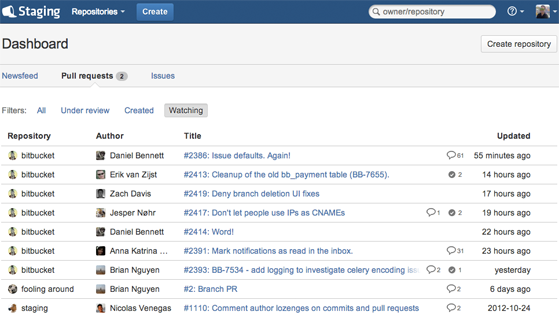
The new Bitbucket dashboard – all your code activity, all in one place.
Let’s face it, we’re rarely ever working on just one thing at a time. In Bitbucket land, many of us have multiple repositories involving any number of pull requests or issues we need to stay on top of. With all that activity to keep track of, getting a proper high-level overview can be difficult. That’s why […]

Pull Requests now with Reviewers and Smarter Notifications
Pull requests provide an easy way for developers to review changes on a branch, discuss changes, and merge the branch into the main development branch. The goal is to be fast and simple. Today we are adding two new capabilities to pull requests that will make your workflow faster and simpler: Selectively add reviewers to your […]

Syncing and merging come to Bitbucket
When developing on a feature branch or a fork, your code can often get out of date. There are a number of reasons this might happen: You’re concentrating on a feature rather than syncing. You’re not yet ready to worry about integrating just yet. You’re returning to a stale branch or fork to pick up […]

Pull requests across branches
Bitbucket already supports fork-based pull requests, and while this model is great for open source projects – where new contributors can fork your repository and submit a pull request – it can feel heavy-handed when working in a small team. Small (and large) teams rejoice! Today we are excited to announce the ability to create pull requests between […]

Introducing Keyboard Shortcuts
Make your Bitbucket experience faster by dropping the mouse and taking advantage of the new keyboard shortcuts. Keyboard shortcuts provide a quick and easy way of navigating through Bitbucket and performing common (repetitive) actions without having to take your fingers off the keyboard. Pages you’ll find keyboard shortcuts useful for include: source code browser commit history […]

Pull requests with side-by-side diffs
Bitbucket now has the option to view file changes—IDE-style—with side-by-side diffs: With both versions of the file shown in full with synchronized scrolling, you can more quickly grok what has changed, making code review easier in: pull requests the compare view individual commits Show me more: expandable context Unified diffs are great for reviewing small […]

Now with Code Commenting and Mentions
Two months ago we revamped our pull request feature to help teams using DVCS and Bitbucket increase their productivity. One bit was missing though; the ability to easily have a conversation around code changes. This is why we are excited to announce threaded commenting for pull requests and changesets! Below is a screenshot of a recent […]