
new feature

Dark theme for Bitbucket Cloud is here!
Software development requires a comfortable setup to be successful. If a key on your keyboard isn’t working, it feels like nothing is working. Your chair, lights, monitor – they all come together to help you be productive. But what’s on the screen matters too. If you’re looking to improve your focus, reduce eye strain and […]

Introducing shadow IT controls for workspace admins
Shadow IT is defined as the use of IT-related hardware or software by an individual without the knowledge of the IT admin. For example, if a user creates a new Bitbucket Cloud workspace within your organization without the knowledge of the organization admin, it can lead to potentially sensitive data being exposed. To help manage this risk, […]

Introducing increased control over forking in Bitbucket Cloud
We recently announced our deep commitment to keeping your code secure in the cloud. With that, we are excited to announce a setting that gives admins increased controls over forking outside their Bitbucket workspace. Currently, a user can fork content from a repository into a workspace outside of your private workspace. While there are some […]

App passwords are here in Bitbucket Cloud
Keeping your code secure is crucial. That’s why last year we added support for 2-factor authentication. However, only having native 2FA support limits you from accessing Bitbucket repositories via 3rd party applications. Today, we’re excited to announce application-specific passwords (a.k.a. app passwords), which will allow you to just do that. App passwords let applications access […]

Edit your code in the cloud with Bitbucket
Have you ever wanted to make a quick change to a file in a repository without having to clone it locally? You want to edit your code where it lives. Introducing the Bitbucket online editor: edit your code directly with Bitbucket – no command line, no cloning, no local editor. Edit any file, anywhere From Bitbucket, you can […]

Beautiful and relevant notifications
Staying up to date on code activity in Bitbucket just got easier. As part of our on-going notifications improvements we have completely redesigned the email notification experience. More control, more options and new HTML emails give you the information you want, when you want it. Every email has been rethought and redesigned for clarity and to keep […]
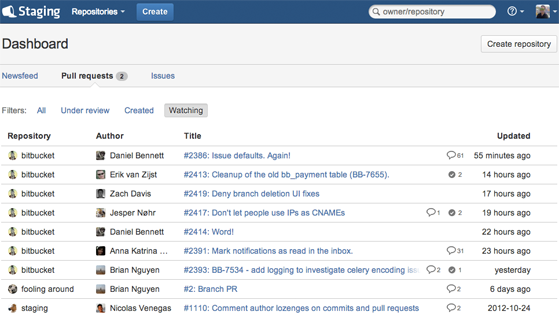
The new Bitbucket dashboard – all your code activity, all in one place.
Let’s face it, we’re rarely ever working on just one thing at a time. In Bitbucket land, many of us have multiple repositories involving any number of pull requests or issues we need to stay on top of. With all that activity to keep track of, getting a proper high-level overview can be difficult. That’s why […]

Pull Requests now with Reviewers and Smarter Notifications
Pull requests provide an easy way for developers to review changes on a branch, discuss changes, and merge the branch into the main development branch. The goal is to be fast and simple. Today we are adding two new capabilities to pull requests that will make your workflow faster and simpler: Selectively add reviewers to your […]

Introducing Quick File Search
Have you ever been in this scenario: you are in a rush and need to find a file that you know the name of, but can’t remember where that file lives? You search the file browser in Bitbucket directory after directory… and finally find that elusive file. When you’re looking for something in your DVCS […]

Syncing and merging come to Bitbucket
When developing on a feature branch or a fork, your code can often get out of date. There are a number of reasons this might happen: You’re concentrating on a feature rather than syncing. You’re not yet ready to worry about integrating just yet. You’re returning to a stale branch or fork to pick up […]

Deployment Keys Now Available on Bitbucket
We’ve received a lot of requests for this feature, and our recent Innovation Week has given us the time to follow through on this request. We’re pleased to introduce Deployment Keys for Bitbucket. Deployment keys allow users to clone/pull source from a repository over SSH using Git and Hg without having to use up one […]

Introducing: Repo Transfers
A couple weeks ago, we launched our new Teams feature to make it easier for our users to collaborate on Bitbucket. Today, we’re happy to introduce Repo Transfers to make it easier to share repositories amongst your team. Repo Transfers allow you to change the ownership of a repository to another team or user account. Transfer any […]

Team Up with Bitbucket
UPDATE: Since we released this feature, we’ve also released a way to transfer your individual repositories to your team. Check out our documentation for full details! It’s finally here! Bitbucket Teams makes it dead simple to create a shared account to consolidate your team-owned repositories and organize your group’s work. Create team-owned repos that everyone can access […]

JIRA integration & other external project links
SourceTree 1.3 makes it easy to navigate to JIRA issues which are associated with your commits – and in fact to other supporting information like Crucible reviews or any predictable pattern in a commit message that you can identify. Linking a repository to a JIRA project If you’re committing code to resolve a JIRA issue, […]

Using submodules and subrepositories
A headline feature of SourceTree 1.3 is the support for submodules (in Git) and subrepositories (in Mercurial). The terms may be different, but they refer to the same concept; that of nesting other repositories within the folder structure of your own repository. The most common reason for wanting to do this is that your project […]