
code

Customize your avatar in Bitbucket (no Gravatar needed!)
After over 700 requests to replace Gravatar from Bitbucket users like you, we’re excited to announce a new avatar picker in Bitbucket. Now you can upload and crop images to personalize your user profile and free private repositories. Upload any JPG, GIF, or PNG via drag-and-drop or the file browser, then easily resize until your image is just […]

Edit your code in the cloud with Bitbucket
Have you ever wanted to make a quick change to a file in a repository without having to clone it locally? You want to edit your code where it lives. Introducing the Bitbucket online editor: edit your code directly with Bitbucket – no command line, no cloning, no local editor. Edit any file, anywhere From Bitbucket, you can […]
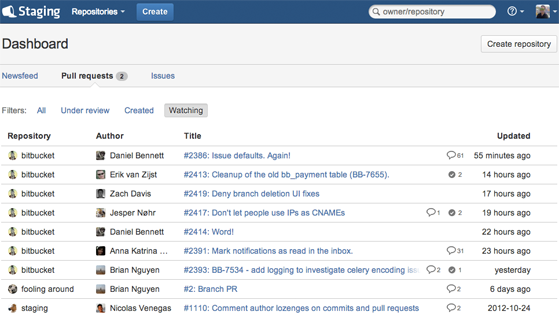
The new Bitbucket dashboard – all your code activity, all in one place.
Let’s face it, we’re rarely ever working on just one thing at a time. In Bitbucket land, many of us have multiple repositories involving any number of pull requests or issues we need to stay on top of. With all that activity to keep track of, getting a proper high-level overview can be difficult. That’s why […]

Pull Requests now with Reviewers and Smarter Notifications
Pull requests provide an easy way for developers to review changes on a branch, discuss changes, and merge the branch into the main development branch. The goal is to be fast and simple. Today we are adding two new capabilities to pull requests that will make your workflow faster and simpler: Selectively add reviewers to your […]

Introducing Quick File Search
Have you ever been in this scenario: you are in a rush and need to find a file that you know the name of, but can’t remember where that file lives? You search the file browser in Bitbucket directory after directory… and finally find that elusive file. When you’re looking for something in your DVCS […]

Syncing and merging come to Bitbucket
When developing on a feature branch or a fork, your code can often get out of date. There are a number of reasons this might happen: You’re concentrating on a feature rather than syncing. You’re not yet ready to worry about integrating just yet. You’re returning to a stale branch or fork to pick up […]

Pull requests across branches
Bitbucket already supports fork-based pull requests, and while this model is great for open source projects – where new contributors can fork your repository and submit a pull request – it can feel heavy-handed when working in a small team. Small (and large) teams rejoice! Today we are excited to announce the ability to create pull requests between […]

Introducing Keyboard Shortcuts
Make your Bitbucket experience faster by dropping the mouse and taking advantage of the new keyboard shortcuts. Keyboard shortcuts provide a quick and easy way of navigating through Bitbucket and performing common (repetitive) actions without having to take your fingers off the keyboard. Pages you’ll find keyboard shortcuts useful for include: source code browser commit history […]

Pull requests with side-by-side diffs
Bitbucket now has the option to view file changes—IDE-style—with side-by-side diffs: With both versions of the file shown in full with synchronized scrolling, you can more quickly grok what has changed, making code review easier in: pull requests the compare view individual commits Show me more: expandable context Unified diffs are great for reviewing small […]